Hiển thị các bài đăng có nhãn Utilities. Hiển thị tất cả bài đăng

Thứ Năm, 2 tháng 2, 2012

Autodesk ForceEffect for iOS : Interactive force diagrams

Yesterday, I installed a new (and currently free) app from Autodesk onto my iPhone, called Autodesk ForceEffect (check it out in the App Store).

With this app, you can draw a 2D schematic of beams, nodes and forces. It will allow you to quickly assess the reacting forces into a structure. The examples included with the app also show you that a photograph can be used as an underlay, to sketch on top of them, e.g. to check a structure in the field.
Gallery showing diagram over photo background
While the iPhone screen is quite small for my not-too-small fingers, it works quite handy: there are automatic guidelines that constrain the direction and alignment of nodes you draw. You can switch units between metric and imperial and use gestures for scaling (pinch), panning (two finger swipe) and editing (single touch). Moreover, while it is hard to sketch an exact size for a truss, you can fix the length be entering the exact value on the dimension line and this will be enforces, even when you start moving nodes around.
Draw nodes and forces with your fingers
Click on a truss, and you get the acting forces (in color, with direction to show pressure or tension).

You can generate a report, which could be used to help you enter the exact nodes and sizes and forces in a FEA software afterwards, when you want to go a step further.
Automatic Report
This is exactly the type of app I would have loved while being an architectural engineering student, quite some years ago. It's intuitive, interactive and free (for the moment?). You'll need an iPhone, iPad or iPod Touch to be able to use the software, but I wouldn't be surprised if they will port it to other devices in the near future as well.

Thứ Hai, 5 tháng 9, 2011

Working in the cloud with free software

This post comments briefly on some of the "cloud"-enabled software utilities that I have started to use more and more. Short definition: these apps will allow you to work from different computers or devices on your data, yet are more optimized and user-friendly than a web page, despite the javascript goodness that seems to flood many new "organizer" and "authoring" and "managing" projects.

I'll discuss Dropbox, Evernote, Skitch and Mendeley Desktop. Not CAD this time, but usable and free utilities that I have start to rely on, almost every day.

Dropbox
(register using this link to give you and me some more space)

This one is quite popular. You want to access your files from different places and possibly share them with others. Dropbox provides a free 2GB (with some more to obtain when referring others) to host your files.

Files are synced, you can work offline, you can have a local folder on your computer (Windows, OSX, Linux) or on one of your devices (Android, iOS etc...).


Just do what you usually do: open and edit files and save them. But rest assured that you will be able to access them on another device as well.

For me, it replaces to a large extent other means of sharing (e.g. ftp) or sending large files (e.g. YouSendit). And when installed as an app, compared to the web-interface, you get notifications for updates and an additional bonus space.

Evernote
http://www.evernote.com/

At my latest conference, someone pointed me to Evernote. This is a note-taking application, where you can start taking notes. By tagging them and organizing them into notebooks, you can structure them at will. E.g. I have personal projects, research, teaching and general computing notebooks, where I edit stuff. You can even add audio or webcam notes alongside HTML-based text-nodes. Images can be included as well and there are some helper tools to snap websites or part thereof.

It also integrated with a wide variety of other tools, so you can e.g. take and annotate a screenshot inside Skitch and have it added to Evernote as well.


Works on almost any device and also through a browser.

I would like to also have an integrated mindmapper (e.g. such as Freemind) and also a simple vectorial drawing tool supporting links (e.g. VUE) so all my note-taking can be merged and synced.

Skitch
http://skitch.com

This is a free Mac screenshot application, but nicely done: it integrates well, includes annotation with ease and also allows easy dragging of any screenshot to an image file or share online with Skitch or to Evernote (they are part of Evernote now).

Now available in the Mac App Store, but also on Android and (soon) iOS.

I've used it for all screenshots on this blog post.

Mendeley Desktop
http://www.mendeley.com/

This is a bibliography organizer for scientists. You can use it to collect, tag and annotate PDFs of publications (articles, books, conference proceedings). It will be synced online and can be used to share publications as well.

There are some lookup features e.g. retrieve from the title using Google Scholar (hit-and-miss) or from the doi-code.

It also integrates with Word or OpenOffice to insert citations and a bibliography and several reference-styles are supported.

While you can use it for non-PDF based documents, this is somehow less convenient. I've started from the BibTex file from my PhD, to insert most of the references I collected and also pointed to a folder where I store most Articles and digital copies of proceedings. That said, it'll take a while to properly organize, tag and correct the entries, but the software is quite helpful.

Not sure why it is free, as the similarly oriented EndNote is not. It is a good alternative. And works on Windows, Linux and OSX and there are iOS versions too to access your references on location. You also receive 1 GB of webspace (500 MB personal and 500 MB for sharing), but more space is not free.


I've had it crash occasionally on certain PDF files, but no harm was done. And sometimes the automatic lookups give false results, but you have to be quite attentive to correctness anyway. Good thing: automatic imports are classified as "to review" and you have to explicitly mark them as "correct" before they are included in the regular database.

Thứ Ba, 2 tháng 8, 2011

OS X Lion : to upgrade or not?

A few weeks ago, the new release of OS X (without the "Mac" now) called Lion, was made available in the Apple App Store (no DVD or boxes to buy!) for the small sum of $29.99. If you are using a Mac and have the hardware to run it (intel, recent processor), you can easily upgrade.

However, having "some" experience with upgrading Operating Systems (from Windows 3.1 till 7, from MacOS 7 till 9, from OSX 10.3 till 10.6, from several Ubuntu and other Linux distros), I know that thing can and will go wrong. Not with the core software from the manufacturer (e.g. Microsoft Office when upgrading Windows or iLife when upgrading OSX). So I started to look around a bit. Snow Leopard (OSX 10.6) still took a while before some of my hardware was supported (some still isn't).

I compiled a list of some of the expected problems for some of the applications I use. I advice you to do the same. Beware, running on the new OS does not imply that applications will support the new features of it (e.g. full screen apps, automatic saving and resuming, new gestures).

There is a nice site that collects user experiences: http://roaringapps.com

What is expected to work without much problems

  • The Mac-version of Rhino3D is regularly updated and has been announced to work for the most part without problems. As this is a pre-beta version, you can not expect full compatibility until it is officially released, but they are working quite well on it.
  • Cinema4D r12 should work fine. I don't expect any problems with the new r13 when it becomes available in September.
  • iStuff from Apple : don't expect too much problems, unless you use really old versions.
  • Screenium screen recording software should work.
  • Unity3D is fine, when you upgrade to the newly released r3.4 (free update).

But then we get into more troublesome areas...

  • Parallels (the software to run Windows or Linux inside OSX) requires a non-free upgrade to release 6. As a free alternative, you could try VirtualBox, which seems to be running well in Lion.
    • I still need MS Windows for Rhino + Grasshopper, for Revit, for Ecotect, for Tekla BIMSight and for Trackmania. Well, I can live without most of that, but prefer to have Grasshopper still available, until it becomes available for the Mac-version of Rhino, which can still take some time.
  • ArchiCAD has problems with Lion (e.g. with slow font rendering). There are some known troubles and you are suggested to wait until they get fixed. Don't count on older versions than 14 to work fine. http://www.archicadwiki.com/MacOSXLion
  • SketchUp appears to have some problems still: http://roaringapps.com/app:31 
    • Previews with Background images
    • Syncing scenes when there is only 1 photomatch scene
    • using the 3D Warehouse
    • some of the pins to set phototextures
    • different scroll behavior
    • the snapping of dialog boxes
    • loading previous scenes behind the welcome screen
  • Ableton Live (I use this for all my music) needs a new upgrade, which is not ready yet. This is software that requires realtime performance and thus speak well to the underlying system.
  • Adobe CS 4 (which I still use) is said to have some problems. I assume CS5 and 5.5 will have updates to run on Lion.
  • MS Office for Mac? As long as you upgrade an existing installation, it should work fine. But Lion removed Rosetta, which is the PowerPC emulator required to run older software. The Office Installer uses that and thus stops working. Some people also had serious problems with Excel (which I use quite a bit) and Entourage (which I stopped using). I guess 2008 and 2011 will both be made compatible with new service packs.
  • AutoCAD for Mac is NOT compatible, but they are working on it. The update is now in beta on the Autodesk Labs, as announced on http://autodesk.blogs.com/between_the_lines/2011/07/autocad-for-mac-2011-update-beta-for-os-x-lion.html
Things I don't know, but which causes serious problems in the past when upgrading to Snow Leopard:
  • I have an older Canon Scanner (Lidescan 30 or 50 IIRC), which never worked well on Snow Leopard. I don't expect Canon to update their drivers... Damn. And I already stopped buying HP Scanners as they don't update their drivers for older hardware.
  • My POD X3 Live is a floor board with Guitar FX and Amp Emulations, which you can also connect to the computer. It took quite some time for drivers to be available for Snow Leopard, so I expect some delay for Lion as well.

So all in all, while the new release is promising and is probably required when iCloud gets released, I'm waiting a bit for the major problems to get solved. I guess I'm getting a bit older, as I used to be very quick on migrating to new releases in the past and live with the problems that caused.

Thứ Hai, 20 tháng 6, 2011

New release of Tekla BIMsight

I was informed by people from Tekla (they did a Webinar preview on 16th of June) that the new version of Tekla BIMsight 1.2 will be released on June 21st. Here is a sneak peek. More info on http://www.teklabimsight.com soon.

BIMsight is a standalone and free application (windows-only) to load, compare and view BIM models. It is  focused on IFC documents, but can load DWG and DGN (from AutoCAD-compatible and MicroStation compatible) applications as well.

The highlights of the original release still stand (I discussed it earlier in this blog : Tekla Bimsight), but the new version adds some nice features:

  • red lining in 3D = making annotations to the model, to give feedback to the model owner;
  • re-locating the model, which I read as being able to position different models (from different files/programs) to be properly aligned;
  • improved management, through grouping and linking (multi-files?)
So far, my biggest gripe is that it is Windows-only, but I intend to use it for a project in which we will have students collaborate using BIM models (together with BIMserver.org for IFC sharing). I was trying to install it in a virtual windows, but I completely trashed this system and had to start all over again.

The software avoids the Desktop-style interface (no Ribbon, less dialogs, tabbed, web-like GUI). Not sure if that suits the target audience, though (architects, engineers, many of them familiar with Windows-based CAD software).

Tekla BIMsight 1.2 Screenshot (with included demo-model)
Performance inside a Virtual machine was not too well, but don't think I can blame Tekla for that. After all, loading several large IFC models simultaneously is not that trivial. While I like the fact you get a fair sight on what is in the model, the biggest problem I see is that you have to know quite well what you are doing to generate IFC's in a particular structure. Having large lists of "WallStandardCase" (all named identically) does not help you that much if you want to look for a particular one. This is something I also noticed in the BIMserver ModelBrowser.

Not sure if the original model or the IFC export or the IFC import is to blame here. But whenever models get large (and don't all architectural/building models have this tendency), there are countless objects with the same name and it becomes hard to keep track of which object is where. Luckily, you have a fully interactive 3D window here, which is a huge benefit.

The biggest comparable software I see, is Solibri Model Viewer, the free Java-based and cross-platform viewer for (single) IFC files. I assume Autodesk NavisWorks is another candidate, although I have never tried it.

Thứ Sáu, 17 tháng 6, 2011

Project Photofly 2.0 available from Autodesk

A free application to turn images into 3D models.

http://labs.autodesk.com/utilities/photo_scene_editor/

The new release of Project Photofly, from Autodesk, is now available in the "labs" and expires at the end of 2011. It is currently free and runs on all recent Windows PC's (Core2Duo recommended, XP or 7 in both 32- and 64-bit).

Beware that to use it, the software uploads pictures to an Autodesk server for processing, so if that does not suit you, then do not use it.

Funny: the software is available only in English, but the End User License Agreement (EULA) is made in 15 different languages.

Thứ Sáu, 10 tháng 6, 2011

Comments on the BIMserver.org Breakfast 2011

Yesterday, I was at the BIMserver Breakfast, in Amsterdam (which is not too far from Leuven by train). At this event, people could download, install and run the Open Source BIM server, to collaboratively host building projects using IFC files.

The BIM Server software

The free, java-based server is easy to install, as it is completely self-contained (even includes a small http-server) and cross-platform. As admin, you can set up some project and define users.

BIM Server (left) and Web administration interface (right)
Currently, this is mostly a specialized, domain-specific, content-management system:
  • Projects contain name, description, sub-projects and geo-location;
  • IFC files can be uploaded and downloaded;
  • people can make revisions (new versions);
  • sub-projects define user roles, e.g. architect, structural engineer, MEP;
  • there is a modelbrowser, which shows the IFC model structure and can be used to make queries (request for particular objects to inspect);
  • RSS feeds allow you to subscribe to revisions;
  • There is a compare option, but only version 1.1 will allow you to compare using the IFC name;
  • You can "tag" certain revisions, e.g. for particular milestones in the project;
  • You can branch a project revision, to make it into an independent, new alternative project.
ModelBrowser
This is Open Source software and is under active development. There was even a particular event to create add-ons during the OpenBIMweek, from which this event was a part.

Query on the BIM Server
Some notable features, which are more domain-specific:

  • Exporting IFC models to e.g. Google Earth is possible, but this generates a simplified version of the model (only walls, roofs and floor slabs, IIRC);
  • There is an optional WebGL viewer included (which works best using e.g. Google Chrome browser);
  • External viewers are being developed, which connect directly to the BIM server, allowing users to load and view a particular revision;
  • Connections to Alfresco and Sharepoint are being developed;
  • You can merge sub-projects (a simple merge and a smart merge are available, the latter avoiding any double and overlapping items). This takes quite some time as models can become very large;
  • Editing the IFC model is not possible. I assume that it could technically be possible by writing an add-on that interacts with the database, but the question is if that is really what you want to enable.

All in all, a very promising software and we intend to use it throughout a new project where we ask students from different schools to collaborate and communicate, using 'any' BIM software that is compatible with IFC (and probably also use BIM viewers).

The BIM Server Breakfast Event

The event itself was very informal. In the style of "Sit down, plug-in your earphones and start doing something." Luckily, the people from BIMserver.org where available for questions and explanations. I would have preferred a bit more structure and guidance. After all, when going all the way to Amsterdam to follow web-movies which can also be followed at home, you need some additional incentive.

Luckily, I also had a few nice talks about BIM, IFC, integration with ArchiCAD, possible solutions for workflows, integration in education etc... which all made the trip to Amsterdam worthwhile. And I had a meeting in Rotterdam the same day, which was also quite productive.

Thứ Ba, 10 tháng 5, 2011

Populate for 3ds Max : architectural parametric modeling

Some years ago, I was working with ArchiCAD and 3ds Max on a Dell Workstation. I started using the plugins from Marc Lorenz (http://plugins.angstraum.at) to help with it. Now I received a mail (funny how long your "old" registrations survive) announcing Populate (http://populate-3dsmax.com)
Please check it out and try the public beta of Populate, it is a plugin for paneling free form surfaces. I worked on it for over 1 year, I think it turned out quite nice.

Regarding my older plugin scripts, here is a quick status update:

Tree Shop: This one is very popular, but also very old. I plan rewriting it from scratch, using new technology from Populate.

Vray Ambient Occlusion: I'm not sure if it's still useful, and if there is a point in improving it, but I get much feedback on this.

Cubic VR: I started working on a fully featured Pano-tour system for 3dsmax,which would replace this.

The new site looks modern, has nice examples and is titled to focus on "architectural parametric modeling solution for 3ds max".

While I stopped using Max, when I migrated to OSX, in favor of Cinema4D, I still believe 3ds max has the edge considering the large community around it writing scripts, plugins, extensions (not unlike AutoCAD, if you ask me).


The software is in Public beta, comes as an "exe" file to install it and will expire, when a new version is released.

Thứ Hai, 11 tháng 4, 2011

Amiproject : creating MS Project files directly in a browser?

I got a nice link as a comment on one of my twitter posts (about GanttProject Open Source software, with which I was struggling).

AmiProject (http://www.amiproject.com) is quite similar to MS Project for creating project planning. It works directly inside a browser and can save the result as an MS Project file. I don't have MS Project (anymore) so I haven't tried to load the result.

The Gantt-view is read-only, so you have to edit all in the table on the left.


One thing that bother me a bit is that is often not trivial or even impossible to configure this to e.g. European date-notation (e.g. 16/3/2011 instead of 3/16/2011). Not sure if I could change this here.

Thứ Năm, 24 tháng 3, 2011

Playmaker : visual scripting for Unity3D

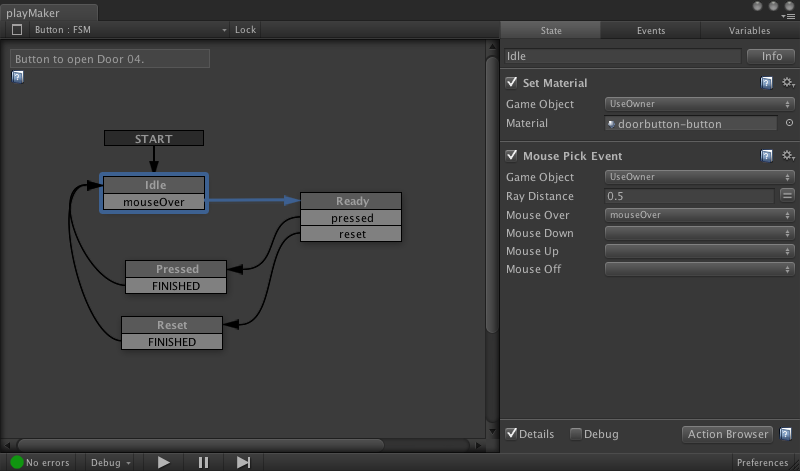
Playmaker is a visual scripting editor that you can install inside Unity3D, the well-known game authoring environment. Within Playmaker, you can create the logic of your interactions visually, without needing to script.

Playmaker screenshot
Remembering the power of scripting and the sometimes cumbersome approach of visual programming, I just wonder in how far they manage to let you mix both: that is, use custom scripts (or re-use existing ones) and then combine this or even integrate this with Playmaker. Cause if this is hard to do, you are obliged to do everything inside this tool.

But it is an interesting approach.

Playmaker is not free (about $100) and works in all versions of Unity (free, commercial, iPhone) with Android in preparation. It can be bought from the Unity Assets store.

Thứ Ba, 15 tháng 3, 2011

Must have Ruby Plugins for SketchUp

On the SketchUcation forum there is a nice visual overview of some usable Ruby scripts to extend SketchUp: http://forums.sketchucation.com/viewtopic.php?f=323&t=16909

Thứ Hai, 14 tháng 3, 2011

NeoAxis Game Engine

NeoAxis is a recent Game Engine, built on top of the OGRE Open Source Game engine.

While OGRE can be used as such, the NeoAxis group is wrapping it inside a more complete authoring system, not unlike Unity3D, which is a real advantage for artists, who are not always interested in the hard-core coding that goes on in the background. I believe that this pertains for most architects as well, hence the success of Unity3D and SketchUp.


NeoAxis runs on Windows and can create both standalone games and web applets. You can use the free non-commercial version or buy a cheap $100 Indie license.


There are people working on a plugin for SketchUp to get models into NeoAxis more easily: http://forums.sketchucation.com/viewtopic.php?f=323&t=32412

From SketchUp free to Unity3D

While there are many ways to go from SketchUp to Unity3D Game engine, having the free version poses serious limits.

  • In the Pro version, FBX and Collada export are intergrated and work fine. However, the free version has problems. While there is Collada export in the Free version, Unity3D fails to properly import the geometry.
  • One approach is to use conversion software. The Open Source Blender is known to be able to import DAE files from SketchUp and export them into an FBX file that Unity3D understands.
  • Another approach is with the LightUp plugin for SketchUp. This is not free, but is a good approach to do shadow and light baking and has an integrated FBX exporter that works fine in Unity3D.

But you can also extend SketchUp with ruby scripts.

On http://forums.sketchucation.com/viewtopic.php?f=323&t=33448 you can download an OBJ exporter script (the old Alias Wavefront format) which Unity3D understands. It is best to export into a separate folder, as depending on how you textured your model, multiple materials could be generated.

Thứ Hai, 14 tháng 2, 2011

Tekla Bimsight

Tekla released a free BIM software that you can use to load and inspect BIM models, in IFC, DWG and DGN formats. This indicates that it is not strictly BIM, but as you can do clash checking and inspect models, this seems a nice tool. They claim that you can use it to combine models from different disciplines and assist with information sharing.

It is only available for Windows.

http://www.teklabimsight.com

Thứ Ba, 25 tháng 1, 2011

Zonematic : ArchiCAD add-on for generating zones

The M.A.D. Zonematic add-on for ArchiCAD, allows you to generate a series of ArchiCAD Zone objects from a text input file.

This is something you could use in the preparing phase for an architectural project, where the required building program is being translated in spaces with certain dimensions. The add-on generates color-coded zone objects, with which you can start to assemble a first building layout.

FormFinder

At http://www.formfinder.at/main/software/ you can download a structural design software which you can use for the creation of "form-active" structures. There is a free Light version and a non-free professional version. Both are only supported on Windows.

Additionally, they software also presents a project-search system, where you can look for other designs that people have shared.

iStructural : web based structural engineering software

At http://www.istructural.com you can check out a structural engineering software that is completely web-based and runs on most computers and operating systems. It has free and non-free account types and provides different systems. Check out the demo to see if this fits your needs (which can not save and has fixed values). Beware that most examples use US units, but you can define a project with SI if you want.

The demo has two main example calculations with which you can play around.

Thứ Năm, 16 tháng 12, 2010

Render[in] : Radiosity rendering for SketchUp

Render[in] is currently in beta-testing till the end of December 2010 and during that time, you can freely request a serial number to test it. It works on Windows and OSX.

Specifics:

  • fully integrated (using native SketchUp features)
  • radiosity in real-time (!)
  • additional control
    • advanced material settings
    • sky & clouds & environment
    • artificial light

Info on http://www.renderin.com

Netfabb Studio Basic and Pro, now also cross-platform

While I already mentioned Netfabb in an older post I recently started using the Studio Basic free version for our Fabbing exercise.
  • The Studio Basic version is limited but free.
  • It is cross-platform, which wasn't the case when I first mentioned this software, IIRC.
While I assume that Magics from Materialise is still the software king for STL repair, it comes at a cost and only works on Windows, so maybe you can give this software a try.

The video below gives a very simple example of viewing and automatically repairing a 3D STL model from SketchUp, exported using a free script, from http://forums.sketchucation.com/viewtopic.php?f=57&t=8447


Simple STL repair using NetFabb Studio Basic from Stefan Boeykens on Vimeo.
A fairly simple model, made in SketchUp 8 Pro using the Solid Tools and exported to STL using the su2stl.rb ruby-script. As you will see, this model has some (minor) issues; such as missing face and some open edges. The free version of NetFabb Studio Basic is able to automatically repair them.
Oh, this works on Windows and on Mac, which is quite uncommon for such software. (There is no audio with this video)

Tgi3D : software for modeling from photographs

The software from Tgi3D (http://www.tgi3d.com) allows you to use photographs, taken with regular cameras, to be used for the creation of 3D models.

There are two products, each in two flavors:

  • Tgi3D SU AMORPH is mainly a set of tools for advanced modeling in SketchUp.
    • view locking > lock vertices in one view and still adjust them in other views
    • generate mesh surfaces from points
    • Bézier curves and generating surfaces from curves
    • Smoothing of surfaces, to make them clean and naturally flowing
    • Remeshing and upsampling, usable to make higher-resolution meshes from low-resolution models
    • Model from cross-sections
    • "Idealize" shapes, e.g. making near flat surfaces fully flat
    • There is a free "Training Version" and a non-free full version.

  • Tgi3D SU PHOTOSCAN adds photogrammetry tools to this.
    • It is a standalone software, comparable to Photomodeller, where you mark points on different photographs, that are then used to calibrate camera settings and positions and 3D coordinates.
    • You can then export the model into SketchUp (or VRML and DXF) and use the native PhotoMatch functionality, but already fully prepared from PHOTOSCAN.
    • Inside SketcUP, you get additional tools for matching lines and curves between photographs, using a tool to lock the vertices and still adapt them in other photographs.
    • There is a free 30 day trial and a commercial version.


Tgi3D Calibration and Metrology Tool from Tgi3D on Vimeo.

Currently, only on Windows, but OSX is marked as "soon", whatever that implies.

Thứ Tư, 1 tháng 12, 2010

Flattery Papercraft Tools

When you want to translate your 3D Design into something flat, you can do it manually (selecting faces and rotating them step by step), or rely on automatic routines.

This can be very useful for making a foldable form on paper or cardboard but also to prepare a 3D model for a lasercutter.

Flattery Papercraft Tools is a plugin for Google SketchUp that promises to automate this.
http://www.pumpkinpirate.info/flattery/

The video below gives a demonstration on the use of this script. While it is perfectly possible to do this without any plugin whatsoever, it is more convenient, as the plugin remembers edge connections (useful when adjusting the layout afterwards) and can do this with less clicks and with some visual feedback.


Unfold SketchUp Model with Flattery script from Stefan Boeykens on Vimeo.
This is a video-only demonstration of unfolding a SketchUp model with the free Flattery ruby-script (from http://www.pumpkinpirate.info/flattery). You have to think forward to avoid overlapping faces. The tools do offer some additional help to correct the model afterwards, but anything but straight cubes can be complex. As always, 3D insight does help a lot with this.

An alternative add-on for SketchUp is Waybe, as illustrated at http://waybe.weebly.com/learn-waybe.html
(but this is not a free add-on).

Manual unfolding?

If you don't have a plugin or want to do it the hard way, remember to group faces before rotating to ensure the edges are unconnected from the neighbours. To group a single face, first double-click it, so its edges are selected with it. This grouping is necessary to avoid seriously deforming the model, since the neighbouring faces stay connected.