Hiển thị các bài đăng có nhãn Programming. Hiển thị tất cả bài đăng

Thứ Tư, 7 tháng 3, 2012

Add iOS and Android license to Unity3D for free

In a surprising but understandable move, you can temporarily register for a free (basic) license for Unity3D and add the iOS and Android Basic licenses without cost.

While the Pro version of Unity3D and the additional licenses of the mobile addons are still about $1500 each, the creation of smartphone and tablet apps has finally been more accessible than ever.

For Android apps you need only the additional Java and Android SDK, but it runs on Windows and OSX. Linux is supported for these SDKs but not Unity3D (yet?).

For iOS apps (iPad, iPhone and iPod Touch), you need a Mac with OSX and an Intel CPU. While you can prototype a full app and remote control it using your iDevice, you need a non-free iOS developer license, which is $99/year for individual developers.

What's the catch? This offer is only till 8th of April and the basic versions lack some of the features of the pro versions, but they are very complete and can be used commercially!

Choose your license (and currency format)...


Check it out at the Unity3D Store.

So, what do you plan to develop? I'm looking at getting interactive architectural models from ArchiCAD, passing by Cinema4D and into Unity3D to end up on the iPhone or on a web page.
$0.00 on the Unity Store receipt page

Thứ Tư, 12 tháng 10, 2011

PythonOCC : Open Source interactive CAD shell (and how to run it on OSX)

What is PythonOCC?

PythonOCC is an Open Source (LGPL) Python-wrapper for OpenCASCADE.

So what is OpenCASCADE (OCC)?

This is an advanced Open Source (custom license) modeling kernel, comparable to commercial engines, such as ACIS or Parasolid, which are used in quite some commercial CAD programs. When you want to develop CAD software, you could use OCC and write programs in C++.

And why using Python?

With this wrapper, you can create CAD and geometry scripts in Python, which is an interpreted Object-oriented scripting language. You can write almost "on-the-fly" and seriously reduce the implementation effort, by skipping the compiling-phase. You can even interact with a running program in the Python interpreter.
Want to read more about this?
So far so good. Now the nasty, technical stuff... I want to have it running on my Macbook Pro. Don't even attempt to do this if you lack the Developer extensions (XCode needs to be installed and X11, which provides most of what you need). I'm using Snow Leopard (OSX 10.6.8) and XCode 3.2.6, which are not the latest versions, now Lion has been released.
The rest of this post is quite detailed, but I'm putting this out for others to comment on and learn from. It is quite a long story, sadly. Not a download, install, accept EULA and run type of software installation.
1. Install OpenCASCADE through OCE

While OpenCASCADE and Python are both cross-platform, OpenCASCADE is not natively supported on OSX. There is a team of volunteers that have done a tremendous effort to get OpenCASCADE re-organized and more tweaked for current compilers and platforms. This is the OpenCASCADE Community Edition (Google OCE-dev Group and Github OCE source Repsitory).

So I downloaded the binary installer from Github for OSX, currently at release "OCE 0.6.0". This will be installed in /Library/OCE/0.6.0 although the installer doesn't inform you about this!

Then you have to ensure the X11.app is available (the XWindowing system, which is quite alien from the native Aqua interface from OSX).

xterm > terminal program in X11
If all goes well, you can test to see if OpenCASCADE (in the OCE version) is properly installed when you can launch DRAWEXE, a graphical, command-line utility to interact with OCE, which is available in the bin folder. There is a menu-window and a prompt in the terminal. This is old school ;)

Then you can follow the DRAWEXE-example from the OpenCASCADE website.


Beware, I've had to manage a few things to get this far:
  • Install Developer tools from Apple (XCode, X11)
  • The binary installer for OCE is precompiled for OSX Snow Leopard (10.6) in 64-bit. If you use a different platform, you should probably compile from sources. This is made easier with the OCE distribution.
  • I've had to install 'ftgl', which is the OpenGL Font Rendering Library. To be able to use that, I had to go to the downloaded ftgl compressed archive, unpack it, open Terminal.app and "cd" into the folder and type:
    • ./configure
    • make
    • make install

2. Install PythonOCC from sources

While the PythonOCC team provided binary installers, they are currently outdated, so I started from the most recent source files. The sources are hosted on github and use the git version control system. This is a tool to work on a local copy, with the possibility to update from the github site, create your own local branches, merge them etc... If you don't know what this all means, you can also download a compressed archive if you want.


I've installed git from Macports or fink, IIRC. Fink and Macports are both ways to install typical Linux-applications, similar in approach to the package manager tools found in Linux (e.g. apt-get). This takes care of getting all dependencies included, without destroying your OSX system too much...

Create a folder somewhere, go into it from the Terminal and type:

  • git pull git://github.com/tpaviot/pythonocc.git

PythonOCC comes with two embedded libraries, which are not trivial to install.

Come to think of it, I had to also install the CMake build system from Kitware... This is an Open Source build system, which makes it easier to write makefiles (the text files to tell your compiler how sources are turned into executable programs). This cmake-file can be written platform-independently (up to a certain level) and be used in Linux, Windows, OSX.

  • SMESH is used for advanced control over meshing and tesselation. Since it is quite hard to install and requires a fortran compiler, they are trying to remove it as a separate module to install.
  • GEOM is a parametric framework, based on SalomeGeometry. The sources are included in PythonOCC (/src/contrib/GEOM-5.1.5.9).
    • Before I could compile, I had to comment out a few lines in the CMakeFiles.txt file, which is the input for CMake. That was because the queried environment variables have changed in OCE 0.6.0 and are to a large extent not required anymore. I placed a # sign before some of the lines:
      • #FIND_PATH(OCC_INCLUDE_PATH Standard_Real.hxx $ENV{CASROOT}/inc)
      • #SET(OCC_LIB_PATH "$ENV{CASROOT}/lib")
      • #FIND_LIBRARY(OCC_LIB_PATH TKernel PATHS $ENV{CASROOT}/lib)
      • #MESSAGE(${OCC_LIB_PATH})
    • Then I started compilation, using CMake in the GEOM folder (but build in a sub-folder to not mess up the source folder):
      • mkdir _MyBuild
      • cmake -DOCC_INCLUDE_PATH=/Library/OCE/0.6.0/include/oce -DOCC_LIB_PATH=/Library/OCE/0.6.0/lib ..
      • make
      • make install
    • If all goes well, the GEOM modules are installed on your system. In my case, the libraries arrived in /usr/local/lib/GEOM-5.1.5.9 and the header files in /usr/local/include/GEOM-5.1.5.9
Now PythonOCC itself... Not fully there, yet... by far.
    I went back to the main pythonocc folder, downloaded from github. The process takes two steps:
    • python setup.py build --disable-SMESH --with-occ-include=/Library/OCE/0.6.0/include/oce --with-occ-lib=/Library/OCE/0.6.0/lib --with-geom-lib=/usr/local/lib/GEOM-5.1.5.9
    • python setup.py install --disable-SMESH --with-occ-include=/Library/OCE/0.6.0/include/oce --with-occ-lib=/Library/OCE/0.6.0/lib --with-geom-lib=/usr/local/lib/GEOM-5.1.5.9
    So this is a two-step process: building and installing. If all goes well, you will have an additional OCC folder inside your main site-packages of Python: /Library/Python/2.6/site-packages

    To check that OCC is actually available inside Python, go (again) to the Terminal.app and type:

    • python

    to launch the current default python (the one installed from Apple) and load the OCC libraries:

    • from OCC import *

    This will take a while, but as long as you don't see errors, you are good to go.


    3. Graphical User Interface and windows?

    While you can start writing command-line python-scripts directly, there is a caveat! There is no GUI.

    And while I would like to say that there is an easy, cross-platform solution, alas it is convoluted on OSX.  Last time I tried to install PythonOCC on Windows, all was up and running in maybe 20 minutes: python, OpenCASCADE, PythonOCC, Qt, PyQt4.

    The PythonOCC team have come up with three "backends" for GUI's and one wrapper class around it that frees the user from too much GUI-stuff.
    • wx : a wxWidgets based backed (which is a cross-platform GUI system, for Windows, Linux, OSX).
    • qt : the Nokia Qt frameworks, including GUI stuff, running on most systems (Windows, Linux, OSX, embedded Linux, some smartphones).
    • python-xlib : an XWindow based simpler layer.
    For OSX, the wx option is, well, broken. Don't attempt it, unless you "really" know what you are doing. I'm not. I tried in the past and gave up. It is a mixture of X11, OSX and hacking.

    And to use Qt in python, you need a wrapper. There is PyQt from Riverbank software (which has some license limitations) and more recently PySide which has a more liberal license. All instructions point to PyQt so that is what I will use.
    1. If you have installed Qt4 before, beware! On OSX, there are two version: qt4-mac and qt4-x11. The first is native, using Cocoa and the Aqua interface. Really good integration in OSX and very usable. While this is totally recommended for any cross-platform development. However... not for OpenCASCADE, at the moment. So I uninstalled Qt4-mac, alas.
      • sudo /Developer/Tools/uninstall-qt.py
    2. Then you need to install the qt4-x11 version, which is far from easy. I used Fink. This is only the bare summary:
      • install fink and update it so it is current:
        • fink selfupdate
        • fink update-all
      • This can take quite a while... and comes with a large amount of software: cmake, python, qt4-mac... However, everything resides in /sw that does not hinder the rest of OSX.
      • Now you are ready to install qt4-x11:
        • fink install qt4-base-x11
      • This comes with a few hundred dependencies and can take quite long (a few hours on my machine). I had to answer a few questions and avoided some "aes" options, as described in my comments on the PythonOCC blog.
      • check that the Fink version of qt4-x11 is installed. Type "qmake -v" into a terminal. It should point to qt4-x11 inside the /sw folder.
    3. Before you can use PyQt4, you need to install another library, called sip from Riverbank Software (who also make PyQt4).
      • Download the installer. I've had an API conflict between the precompile PyQt4 form the PythonOCC.org site, so I have to use an older version.
        • SIP-4.12.3 complained:  "RuntimeError: the sip module implements API v8.0 to v8.1 but the PyQt4.QtCore module requires API v7.0"
        • SIP-4.10 worked fine.
          • python configure.py
          • make
          • sudo make install
    4. Now you can use the pre-compiled PyQt4 provided on the PythonOCC.org website. There are pre-compiled released for OpenCASCADE and PythonOCC too, but they are for older versions (OCC 6.3.0, while OCE 0.6.0 is using OCC 6.5.1). The number difference is small, but is about two years older.
    5. --- EDIT ---- I've had to hack one line in the OCCViewer.py file (installed inside your Python site-packages folder: the first line was included, but gave an error when running a script using the GUI. I've had to replace the modules call with the expected result string:
      • comment out v3d_module_library = sys.modules['_V3d'].__file__
      • replace with v3d_module_library = '/Library/Python/2.6/site-packages/OCC/_V3d.so'
    Finally something that works

    Now some picture of a running system...

    Double-clicked a python script in the PythonOCC Examples/Level1/Geometry folder, called "Geometrydemos.py". X11 should be started and the python script runs inside a Terminal.


    This is an interactive view: you can zoom, pan, orbit, select items and call some commands in the menu. It uses X11 for display (see the X-cross in the window), but other than that, it runs directly inside OSX.

    My personal thought: installing XCode, X11, fink (with hundreds of programs that are already inside OSX), OpenCASCADE, qt4-x11, SIP, PyQt4 and finally PythonOCC to make small scripts is quite a contradiction... But it is open, flexible, cross-platform and can be the basis to prototype a new CAD system that innovates.

    Thứ Năm, 25 tháng 8, 2011

    ifcOpenShell : Open Source IFC Library/Framework & Geometry Conversion

    ifcOpenShell (http://ifcopenshell.org)

    This is an Open Source projects, written in C++ and which uses the Open Source OpenCASCADE or OCC libraries for all geometric work (info on http://www.opencascade.org). It is currently available as Source code and some basic programs are written:

    • a 3ds Max IFC Importer (as a max plugin), compiled into a DLL (but renamed for max);

    • a Blender IFC Import script (in Python);

    • a standalone convertor to translate IFC geometry into a Wavefront OBJ file.

    They use a common parser library and the OCC libraries.

    I was mostly interested to the approach of both the setup of IFC classes and the integration with the geometry kernel. Currently, the focus seems to be on extracting the geometric objects from IFC files, to use in other software, e.g. for 3D Visualization.

    For me, the more interesting aspect would be the other way around: having complex, freeform geometry and convert this into valid IFC models for analysis purposes.

    Compilation Problems

    It is currently working fine in Windows and should compile on Linux, but I had problems with OSX compilation. From my (limited) understanding, this is due to the use of an outdated GCC version in OSX, when compared to Linux distributions. However, switching to a compiler not provided by Apple is not trivial. Moreover, during compilation, my whole system is getting really slow and memory is eaten quickly. So I have not been able to use it in OSX (yet).


    ifcGears : Open Source IFC Library/Framework & Viewer

    ifcGears (http://www.ifcgears.com)

    This is a C++ Open Source library, providing a framework to generate IFC reader/writer classes from the Express files.

    In addition, there is an IFC Viewer program, using OpenSceneGraph or OSG (http://openscenegraph.org) and Nokia Qt SDK (http://qt.nokia.com).

    Compilation Issues

    I was able (after some serious struggle) to compile the ifcGears library and the ifcGearsViewer on OSX.
    It uses the CMake build system (http://cmake.org) which has support for OSG. But the GUI-version of CMake on OSX does not properly generate all settings, as it seems to miss the environment variables somehow. When generating the XCode project or the Makefiles using cmake from the command line, things run smoother.

    Anyway, if you use the graphical CMake, you have to ensure that all libraries are found. I have only used the release-versions.

    With the OPT_VIEWER you can optionally enable the generation of the IFC Viewer too, but you need OpenSceneGraph installed properly (which was also a bit of a problem on OSX, but I'll skip that in this post). I used version 3.0.1. In addition, you also need Qt available (qmake etc...). I used version 4.7.

    All was compiled for 64-bit (x86_64) for Intel and using Cocoa (native) instead of Carbon (deprecated), but it should be possible to make 32-bit versions for PPC and Intel too.


    With all of that into place, I was able to compile the library and the viewer.


    The red commands are probably due to the IFC-version used when exporting the model from ArchiCAD. I am not worrying too much here, as I have to test more.

    I see no Windows or Doors and some walls are apparently not visible. When trying a single wall with a door and a window, the openings got hidden beneath the closed wall geometry, so more work seems to be required.

    IFC-SDK : Open Source IFC 2x3 Library

    IFC-SDK
    Formerly: http://www.osor.eu/projects/ifc-sdk
    Moved in Dec 2011 to https://joinup.ec.europa.eu/software/ifc-sdk/home

    This is an Open Source C++ library for reading and writing IFC files. It does not depend on any external libraries and can be compiled on most modern compilers. It was tested on Windows (g++ and VC++ 2003+2005) and on Linux (g++ 3 and 4).
    I had no problem compiling it on OSX Snow Leopard, using XCode 3.2.5.

    It contains a STEP library and an IFC library, alongside a quite large list of example programs, including tests, to explain the features of the library.

    Using CMake it could compile the full library without problems and the example programs seem to work fine. They are all command-line, so no GUI problems, but nothing fancy to see either.


    However, there are some caveats...
    • I see very little actual information (project homepage, author and licensing details).
      • however, inside the source code, it is "copyrighted 2009 CSTB" and released under the LGPL 2.1 license, which is Open Source, but with the possibility to link it in a commercial software.
    • Last update was in October 2009, which is a bad sign... as it seems to not be (publicly) maintained. It is numbered 1.0-beta.
    • The library is made for IFC 2x3 which is not the current version of the IFC standard.
    • Most of the included examples focus on the geometric aspects and not the building information
      • ifcRevolvedAreaSolid_app (see above)
      • ifcVector_app
      • ifcShellBasedSurfaceModel_app etc...
    So if anybody has more details about it and if a more recent version is available, then please comment.

    Open IFC Tools : Open Source IFC Libraries and software

    Open IFC Tools (http://www.openifctools.org)

    This is a set of Open Source (for non-commercial use) libraries written in Java. It should work on Windows, Linux and OSX.

    They follow a modular approach, where different packages are being released in order:

    1. Open IFC Java Toolbox

    2. Boolean Modeller

    3. IFC-loader for Java3D

    4. 4D Scheduling Assistant

    Currently, only the Toolbox is available, together with a Java Webstart demonstration to launch the software directly from a browser. This automatically installs the necessary extensions for Java3D, OpenGL, GlueGen.

    I tried the web-demo but first had to update Java3D on my Mac (as mentioned on http://www.openifctools.org/Open_IFC_Tools/mac_java3d.html).


    This viewer loaded the ArchiCAD file without problems and displayed it adequately. You get a view on the actual IFC code, a 3D visualization, the hierarchic object tree of the Spatial structure and the particular attributes of selected entities, which is exactly what you need from a viewer.

    The yellow color is the highlight color of the wall I selected, on the ground floor ("Gelijkvloers" in Dutch). It displays the wall information, the ID (unique), the Name (as named inside ArchiCAD) and the connectivity with other objects.

    This is quite comparable to what is provided by Solibri Viewer, so the implementation is fairly complete.

    For an end user, you might be a bit scared away with all the nitty-details from the IFC files and indeed, a literal display of what is inside an IFC file can be pretty daunting, when you are accustomed to a more user-friendly display from e.g. ArchiCAD or Revit.

    Open Source IFC Frameworks : some experiences

    I have been looking at programming Frameworks for IFC (Industry Foundation Classes), the open standard to exchange Building Information Models. I assume you are at least aware of what they are and what they contain...

    While most commercial BIM software currently exports and opens IFC documents, I was interested to learn about actually doing something directly with these files, e.g. analyzing and visualizing or even generating them.

    There are a few free IFC viewers available. Tekla BIMsight and Solibri Viewer are both recommended (the latter even cross-platform). But they are closed and can not be adapted for other purposes. However, I also read about a few interesting Open Source projects for creating and opening IFC files.
    In the next posts, I will discuss some of them into more detail and try to have them running/compiled on my computer. I discussed BIMserver in an older post.

    But first some overall thoughts.

    • Large class libraries: IFC contains a large list of classes. Most frameworks generate C++ or Java classes from the IFC schema files, which is obviously the smart thing to do. Certainly when things do not work well, as you can alter the generation procedure and 500+ classes are updated.

    • Viewers: in most cases, people start with viewing (or parsing) IFC files, to visualize them as lists or 3D models. However, when thinking about generative architecture and procedural design, it would be nice to have model generators too. Open Toolkits might be a way to start supporting them.

    • Cross-platform or not? The examples I found are either C++ or Java. The Java libraries should work on all platforms, whereas for the C++ libraries it depends. The class libraries themselves are commonly platform agnostic,  although many use recent libraries or even newer language constructs that are not always supported everywhere. The viewers are commonly using external libraries and they are not always cross-platform (although many are). As most BIM development seems to occur on Windows machines, I am particularly wary about having it supported on OSX as well. Usually, when Windows is supported, the next platform that is attempted is Linux, and in many cases this is available. But compilation on OSX is usually left at volunteers. So I will try to see if I can help a bit.


    Thứ Sáu, 19 tháng 8, 2011

    CryENGINE 3 : free SDK for non-commercial work

    The CryENGINE is a professional Game Development system, in which you can fully author interactive content, games, simulations. The Software Developers Kit (SDK) was already free for schools, but now individual students can also freely use the 3D engine.

    It is a powerful platform, but it requires fairly up to date hardware and Windows.

    I have not had the chance to use it, nor play any of the CryENGINE powered games, but it is one of the more famous ones (apart from the Unreal Engine and the Unity3D engine which both are also freely available under certain limitations).

    Info on http://www.crydev.net/dm_eds/download_detail.php?id=4

    Thứ Hai, 6 tháng 6, 2011

    Karamba : I'm slowly getting started

    In my recent quest to discover possible tools for design analysis, I already noticed Karamba, which is a free (for now?) Grasshopper-plugin for integrated structural calculation.

    It means you can define a structural system, with beams and loads and with control over connectivity, support conditions (degrees of freedom of nodes) and analyze it directly within Grasshopper. Real-time if possible. Nice.

    So I launched Parallels Desktop and stepped through the manual (which is well-written!) and tried to create a basic learning example. Don't shoot me if there are glaring mistakes in this, as I have to re-learn some of the things that have been kept under a rock for the last 10 years (Finite Element Analysis, Building Mechanics).

    The following screenshot displays a small example with three nodes, two beams and a single force. The nice thing is that, once this is setup, you can interactively play with it, e.g. move nodes, adjust the force, with the simulation running alongside.


    With some preparation and list-juggling, you can make quite complex structural systems. Just not right now for me, as I have to ensure I do some side-by-side comparisons (running existing examples through different systems).

     --- edit ---

    Just playing a bit and adding a second example. Here I used a freeform curve and using the Divide and Shatter components in Grasshopper turned them into a range of different curves, fed into the Karamba calculation. Being able to tweak in real-time the position of the load (onto any of the nodes) has a huge didactic potential for students and designers.

    Thứ Năm, 19 tháng 5, 2011

    iRhino V5 contains PanelingTools (without GUI)

    With all the attention that the Grasshopper plugin receives for Rhino, it is understandable that people look less at other approaches. However, I was pleased to understand that the current test-version of iRhino (the Mac OSX port of Rhino), which is now more or less in sync with Rhino V5, contains the PanelingTools.

    The Paneling Tools are a plugin for Rhino v4 or v5 and are already included in the latest builds for the OSX version. These commands add the creation of grids and panels and patterns to Rhino. You can generate independent grids or add grids based on surfaces, curve/surface intersections or projections in the first step and then use the generated grid of points to generate paneling.

    Paneling can follow patterns (pre-set or custom created) allowing you for quite elaborate translations of freeform geometry into something more rationalized for construction and/or fabrication.

    The tools can be controlled with a series of "pt" commands, and also through RhinoScript or Grasshopper.

    The OSX version lacks one important detail: a GUI! There are no toolbars to call the commands so you have to type the commands yourself. That said, this is not as bad as it sounds. Just start to type "pt" and a popup window presents you with an autocomplete list of valid commands.

    While these tools have been in the Rhino Labs for quite some time, I only realized recently that the Mac-version has received them as well.

    Thứ Hai, 9 tháng 5, 2011

    DebunkTheBIM: Dear building owners: we will let you know what you need to know when and how WE think you should get to know it!

    DebunkTheBIM: Dear building owners: we will let you know what you need to know when and how WE think you should get to know it!

    As a reaction to this post and venting some ideas on my own blog, I'd like to add some comments here.

    I agree that most model viewers are very limited and only focus on 3D mesh + textures/color.
    E.g. the Virtual Building Explorer (VBE) from Graphisoft (add-on for ArchiCAD) goes some way to make the design "viewable" by a user but don't expect the actual bulding information to be intact. It has gravity and collision detection (you can't walk through walls and you fall down when you pass an edge).

    However, if you want, you can do a lot of that but you have to do it yourself... I happen to like Unity3D as a 3D realtime platform (and the free version goes a long way to do almost anything, apart from realtime shadows). But my remarks are not (too) software specific. Just that I will focus on things I know will work.

    • if you need north angles etc.. add some mesh objects to visualize that. This is possible with any software. In e.g. ArchiCAD, the quite flexible GDL library objects can be programmed so they orient themselves to north automatically. In an interactive environment, you could even program a small "HUD" (heads-up-display) which will draw the north angle as an overlay over your view, like the "radar" image in many shooting games does.
    • levels and spaces/zones are indeed mostly part of the 2D workflow. However, in e.g. ArchiCAD you have the option to render the spaces as 3D objects, which will enable them in any 3D model export you perform. The trick is now to ensure you can toggle spaces on and off in the viewer. In a out-of-the-box solution this is a problem, unless layers are user-togglable, but in a programmable environment you have control over this. You can even toggle an info dialog when users enter a space.
    • grids are also 2D, but with some clever 3D object, it might be viewable in 3D as well. But you have to take your audience into account, as this is not always useful information for them.
    • As far as visualizing design intent, I assume that you can get some way by making design variants and make separate visualizations or merge them in a single scene if you can toggle their visibility from within the viewer.
    • Tagging > as a flexible way to attach "any" info to "any" object, you can attach meaning to design objects. Now if viewers would have custom filters to display or hide objects based on their tags, you can get quite advanced additional visualization. I know that ArchiCAD supports markup highlights (color coding) on objects and you can create different views based on that info, but the same as with the previous remark: you have to find a way to provide this visibility to end users.
    Understand that all these gripes are correct and to the point. I only wanted to point out some approaches to tackle at least some of them with current software.

    I hope I can illustrate some of these points myself later on, with an interactive example...

    Thứ Sáu, 6 tháng 5, 2011

    Paracloud GEM : now also on Mac OSX

    Paracloud GEM (http://paraclouding.com/GEM) is a generative modeling system, which can be used to generate patterns on other mesh-based geometry. It can be used standalone or in collaboration with other software (e.g. SketchUp, Rhino, Maya, Cinema4D).

    You can freely download the trial, but to use it fully, you need a license. You can buy a temporary one-month license or a full license (commercial and academic pricing is available).

    At first, it can be puzzling to get started, as many of the icons in the interface are not self explanatory. But there is a tutorial which should get you going in about an hour or two, which is reasonably fast.

    Try the online documentation.

    Remember that Grasshopper and Generative Components, which are the most popular generative modeling approaches for parametric architecture, are both Windows-only solutions, although there is a slight chance that Grasshopper will eventually be ported over. This way, Paracloud has the OSX market for this kind of design almost exclusively for itself. Other solutions for Mac? AutoCAD with scripting (not visual), Rhino OSX with scripting (not visual), Houdini (visual programming), ArchiCAD GDL Objects (pure code).

    Example

    edit: I made a quick loft model in Cinema4D, exported as OBJ and loaded it into GEM. This was offset and populated with an X-cross.

    GEM design from a Cinema4D mesh

    Thứ Tư, 4 tháng 5, 2011

    LibAster Structural and Thermomechanical analysis in Python

    Based on CodeAster, LibAster is an Open Source Python-library for structural and thermomechanical analysis. Using Python, it should be quite portable between platforms.

    While this is not as user-friendly to get started, e.g. when comparing with full Desktop applications, having a library or command line tool makes it easier to connect into a workflow.

    Right now, I would like to reach a point where I can launch energy, cost and structural analysis from BIM models, where, in addition, the generation of the BIM model would be generated parametrically. Translated into software names, this could mean something like steering a design from Grasshopper, transferring it into ArchiCAD or Revit or (preferably) IFC and launching different analysis calculations in parallel from there.

    Thứ Năm, 28 tháng 4, 2011

    FermaNext : Open Source structural Analysis (and failed attempt to compile it on OSX)

    FermaNext (http://sourceforge.net/projects/ferma) is an Open Source stuctural Analysis software for Windows and Linux.
    Ferma is a free educational CAD software for truss units analysis. It is grounded on the construction conception and designed for finite element calculation and optimization of 2D truss structural units.
    Struggling with OSX compilation

    After re-installing the Qt SDK (Qt 4.7.2 for Mac) recently, I made an attempt to recompile this software from the provided sources, as there was only a Windows and a Linux version prepared. Unfortunately, this is quite complex because of dependencies and non up-to-date packages... I failed. But got reasonably close.

    Qt Creator read the Pro-files and created a full project structure. But the dependencies were harder:

    • expat (sources for this XML parser are included) did not compile, as it only contained some hints for Mac OS Classic. I added an "__APPLE__" directive to at least get through with it.
    • Anti-Grain-Geometry (AGG) was also there but also gave some linking problems.
    • this software apparently uses Java plugins (which was a surprise for me for a C++ application). I downloaded Apache Ant and added an environment variable to find it. Launching Qt Creator from the bash-promt helped to pick it up at compilation time.
    • it uses a deprecated and non-documented "QAtomic" class, which has been replaced with QAtomicInt and QAtomicPtr since Qt 4.4. As I didn't have a clue on what was going on (well, it was about shared pointers and reference counting), I had problems replacing the call to QAtomic with similar calls to these new classes.
    • I had to remove a linking instruction "-enable-dynamic" wich is not required on OSX.
    Most of the software seemed to compile, but still not all of it. Anyone on OSX made an attempt? Would be nice to have as an additional tool. But I did get a chance to see how a Qt project can be prepared to include different libraries and how a more complex project is set up.

    Thứ Hai, 11 tháng 4, 2011

    Slingshot for Grasshopper

    As a reader of the blog/tweets from Andrea Graziano, I was informed about "Slingshot". This is an approach to model and coordinate design information in different software environments. In this case, MySQL and Grasshopper are linked, which could be really useful when put in a wider perspective.

    So far, I haven't dived too deep into Grasshopper, but there are reasons for that:

    • it's a moving target (it is still in continuous update mode);
    • it does not work in OSX. Booting Windows 7 in Parallels is feasible, but I'm avoiding it more and more;
    • it is disconnected from work done in BIM software (ArchiCAD in my case);
    • I don't see it perform into a complete design product, more like sub-parts of it.
    • I could be wrong.
    At least, this shows that people are exploring ways to go beyond a single application/implementation.

    Capturing design intent into a readable, reusable and explorable way is what really makes computing and software a part of the design process, rather than the representation process.

    Thứ Sáu, 1 tháng 4, 2011

    Blog about GDL in ArchiCAD

    The Rabbit Hole (http://web.me.com/karpenglish/RabbitHole/BLOG/BLOG.html) is a recent blog sharing tips and examples on GDL scripting for ArchiCAD.

    Thứ Năm, 24 tháng 3, 2011

    Parametric Architecture with Grasshopper (upcoming book)

    Register at http://www.edizionilepenseur.it/edizioni/en/in-press.html to get informed when the English translation of this book on Parametric Architectural Modeling with Grasshopper will be available.
    Parametric Architecture
    As an old-fashioned book-reader, I still like to learn from books. I can pause and rewind at any time and through diagonal reading find it easier to retrieve certain info, when compared to video tutorials. That said, video tutorials are nice when you are doing something else along that only requires your hands, but only a small part of your brain, like doing the dishes or ironing.

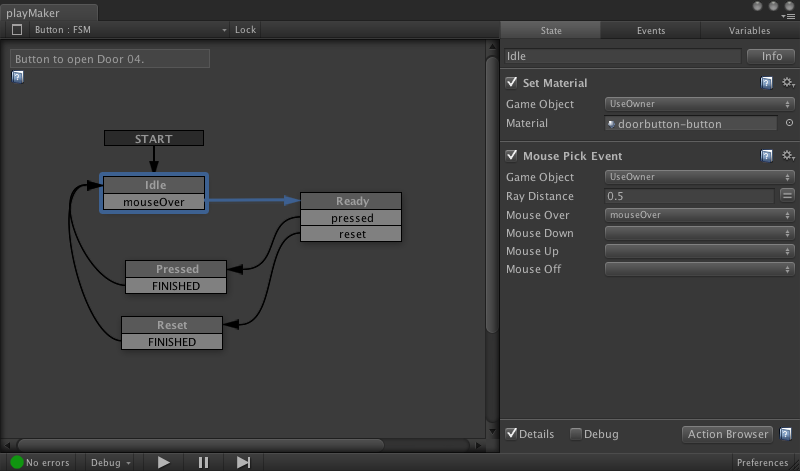
    Playmaker : visual scripting for Unity3D

    Playmaker is a visual scripting editor that you can install inside Unity3D, the well-known game authoring environment. Within Playmaker, you can create the logic of your interactions visually, without needing to script.

    Playmaker screenshot
    Remembering the power of scripting and the sometimes cumbersome approach of visual programming, I just wonder in how far they manage to let you mix both: that is, use custom scripts (or re-use existing ones) and then combine this or even integrate this with Playmaker. Cause if this is hard to do, you are obliged to do everything inside this tool.

    But it is an interesting approach.

    Playmaker is not free (about $100) and works in all versions of Unity (free, commercial, iPhone) with Android in preparation. It can be bought from the Unity Assets store.

    Thứ Ba, 15 tháng 3, 2011

    Must have Ruby Plugins for SketchUp

    On the SketchUcation forum there is a nice visual overview of some usable Ruby scripts to extend SketchUp: http://forums.sketchucation.com/viewtopic.php?f=323&t=16909

    Thứ Hai, 14 tháng 3, 2011

    NeoAxis Game Engine

    NeoAxis is a recent Game Engine, built on top of the OGRE Open Source Game engine.

    While OGRE can be used as such, the NeoAxis group is wrapping it inside a more complete authoring system, not unlike Unity3D, which is a real advantage for artists, who are not always interested in the hard-core coding that goes on in the background. I believe that this pertains for most architects as well, hence the success of Unity3D and SketchUp.


    NeoAxis runs on Windows and can create both standalone games and web applets. You can use the free non-commercial version or buy a cheap $100 Indie license.


    There are people working on a plugin for SketchUp to get models into NeoAxis more easily: http://forums.sketchucation.com/viewtopic.php?f=323&t=32412